

LOOKOUT
Land & ROW Management
Know exactly where every parcel stands.
Lookout gives land teams a single platform to track parcels, manage acquisition workflows, and visualize project status in real time — from first contact to final easement.
Built For:
Survey Firms
EPC Field Services Teams
Asset Operators
Product Feature Sections
Page headline: Everything your land team needs, in one place.
Page subheadline: Lookout brings your parcel data, acquisition pipeline, and team workflow together — so nothing falls through the cracks on the way to the right-of-way.
Feature 1: Parcel Search & Data Lookup
Headline: Find any parcel. Fast.
Body: Search, pull, and review parcel data without jumping between systems. Lookout gives your landmen instant access to ownership records, legal descriptions, and property boundaries — all mapped and ready to work with.
Feature 2: Boundary & Mapping Tools
Headline: See your corridor clearly.
Body: Visualize project boundaries, centerlines, and ownership polygons on an interactive map. Multiple team members can view project status simultaneously, so your office and field are always working from the same picture.
Feature 3: Deal Tracking & Workflow
Headline: Never lose track of an acquisition.
Body: Manage every parcel through its full lifecycle — from initial contact to executed agreement. Track deal stages, assign agents, log activity, and monitor progress across your entire project pipeline in one place.
Feature 4: Reporting
Headline: Reports that actually tell you something.
Body: Lookout ships with six built-in reports designed for the way land teams work:
Project Summary — top-level status across all parcels
Acquisition Pipeline — deal stage breakdown by project
Survey Status — parcel-level survey tracking
Agent Workload — activity and caseload by team member
Financial Reports — budget and compensation tracking
Activity Logs — full audit trail of every action taken
No custom configuration required. Run them on day one.
Feature 5: Team Collaboration
Headline: Your whole team, on the same page.
Body: Lookout is built for teams. Role-based permissions keep the right people in the right data, while real-time project views give managers full visibility without disrupting the work.
Feature 6 (Team & Enterprise): Advanced Workflow Management
Headline: Multi-project. Multi-corridor. No problem.
Body: Managing multiple active ROW corridors at once? Lookout's Team and Enterprise tiers support concurrent project management across your full portfolio, with the analytics and structure to keep every corridor on schedule.
How It Works (5-step section)
Request a demo.
Get set up with your team.
Load your projects and parcel data.
Track acquisition progress in real time.
Close ROW faster.
CTA: Schedule Your Demo
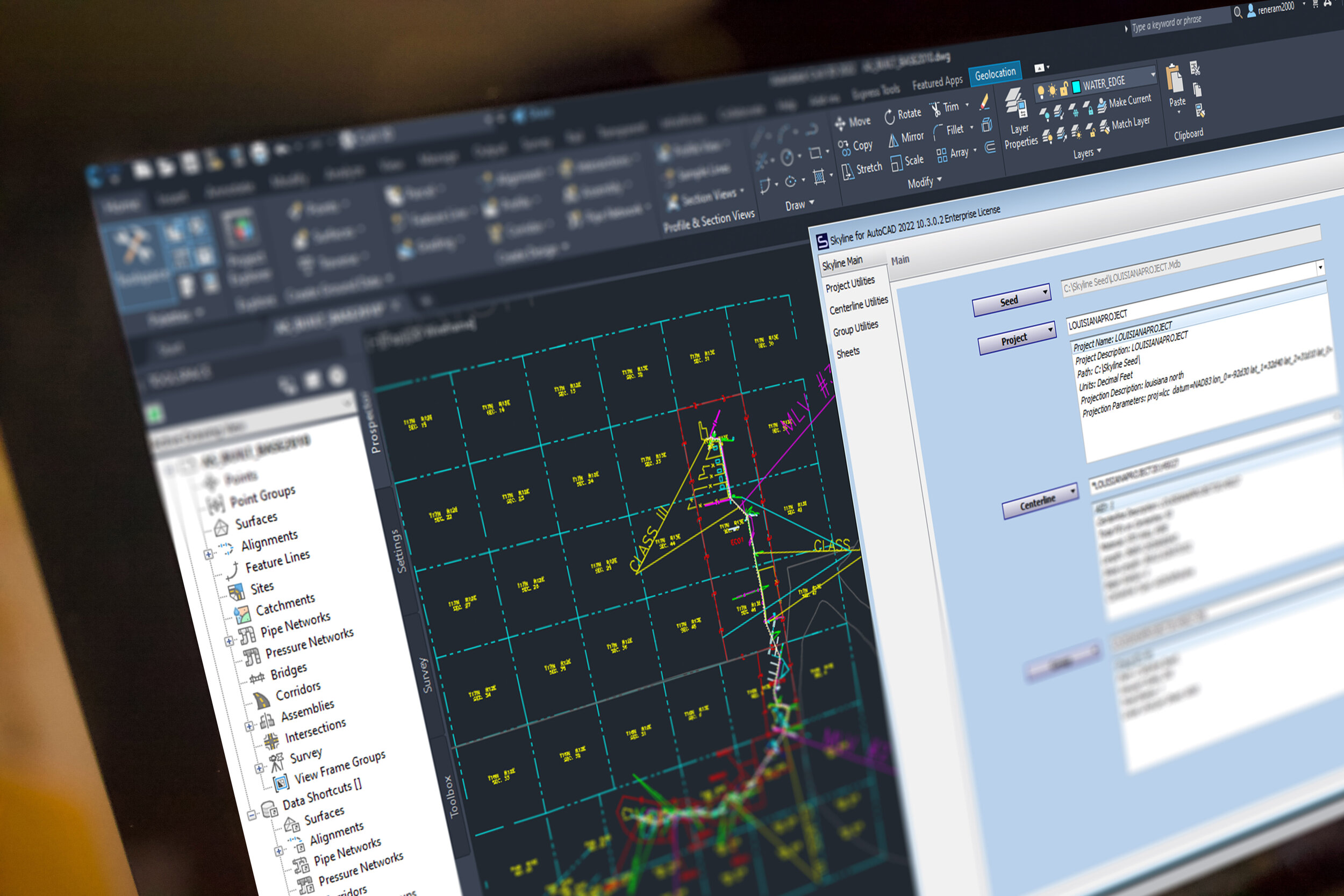
Cut sheets fast.
Respond fast to project changes. You can easily import new data from tons of sources, without having to restart any work you’ve already completed. Because Skyline keeps records of calculated linear referencing, your sheets are always ready to run.
Update, don’t restart
Skyline has the unique ability to update sheets with only the new information you’ve imported. Instead of starting over, just generate the sheet updates that you need.
Import, Cut, Repeat
The speed for processing project changes is what makes or breaks timelines and budget. Skyline speeds up your workflow for reroutes, new data and changes from engineering.
Leverage AutoCAD
You can leverage the work you’ve done in AutoCAD already. Symbols, styles and borders are easily integrated into your Skyline project for fast setup.
Precise, and flexible.
With thousands of optional settings, Skyline is designed for you to easily create the sheets you need.
Skyline is typically used for:
Oil & Gas Pipelines
Fiber Lines
Underground Power Lines
Water Lines

Smart drawings
Skyline manages the elements on your sheet to reduce any need for cleanup after sheet generation. Element collision detection, and whitespace management keep sheets pristine.
Precision control
Take control over the precise location of each component of your sheet. Scale, offsets, and whitespace management make sheet gen move fast, with little-to-no editing afterwards.
Meet project requirements
Skyline has been used to deliver projects to hundreds of your clients. It’s adapted to meet almost every requirement out there. And we update the software all of the time to meet anything new.
2D and 3D stationing.
Skyline calculates the 2D and 3D linear referencing, and stores it in an open database for easy reporting and delivery.

Switch at will
You can easily switch between slope and horizontal stationing, since Skyline stores both kinds of calculations in the database.
Apply station equations
Station equations are easily managed and applied. You can stack multiple equations on top of each other. And if you’ve made a mistake, you can always revert back to the original station values.
Calculate stations for anything
Skyline will calculate stations for any point, line or polygon in your project. Even offset features will be given an offset station value. Additionally, all of this data is stored in a database. Attend our Blue Sky Certification course to learn how to extract and put this data to use in new and valuable ways.
Take this info to-go.

Bands for days.
Skyline comes with 13 different out-of-the-box bands for you to take advantage of, including the plan view, profile and stationing bands. You can also create user-defined bands for endless customization.
Point, linear and polygon
You can generate bands for almost any kind of data in your project. All come with extensive data and drawing controls.
Cut sheets in style.
Use AutoCAD’s full-featured style editor to define the details of every band that you cut. This makes everything easy and intuitive.
Bring your own border.
You can use the borders that your team already has. No modifications are needed. Skyline comes with a tool to import your border and it’s bands into the system.
Sheets for
☑️ design
☑️ construction
☑️ as-built
☑️ asset integrity.
When you map with Skyline, you can run projects through any phase throughout the life of an asset.

Report on ever-changing designs.
Now you can manage the constant iterations inherent in the design phase of a project. Take whatever engineering throws at you and respond instantly with pristine alignment sheets.
The power to handle the challenges of as-built data.
The as-built phase has the most intense data-management needs. Approach your project with the confidence that your alignment sheets will be accurate, and reflect what was built.
Field ops and integrity reporting.
Skyline is used regularly for maintenance work, and reporting on asset integrity. Use the powerful graphing features to create the most compelling integrity graphs in the industry.
Check out the Skyline Reports extension.
Get your clients the information they need, fast.

Now includes plat generation.
Generating plats has never been faster.
Or easier. See More ->
Automatically draw one or thousands of plats.
Skyline plat is fast, regardless of your project size. Tables, labels and a massive amount of details are automatically created for you.
Dynamically label centerline crossings.
Minimize rework and get a clean drawing quickly with automatic annotations, labels, and title block elements.
Import your own border and styles.
Easily import your own border into Skyline. Skyline will read the draw areas and adapt to the way that you do plats today.
95.45% of users say Skyline has increased their production speed.
Get started now.
Step 1
Schedule a live demo with our team.
Step 2
Reserve your training day.
Step 3
Cut sheets faster and deliver on time.